Python Experience
Arcpy package
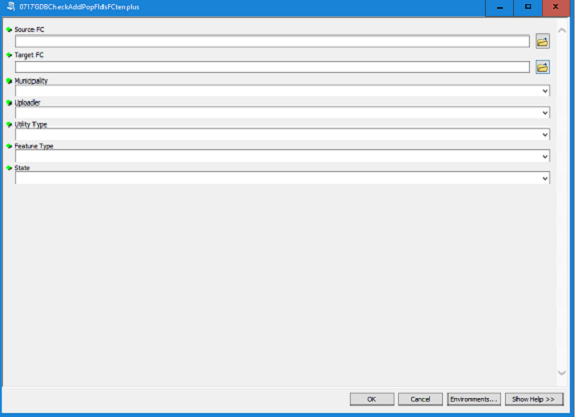
Script tool to add and populate fields
# **** BE LOADED INTO AN SDE FEATURE CLASS
# **** THE TYPE, NAME AND LENGTH OF THE FIELDS IN THE TARGET FEATURE
# **** CLASS MUST CONFORM TO THOSE OF THE MATCHING FIELDS IN THE SDE FEATURE CLASS
import datetime
import arcgisscripting
import os
import sys
import types
import locale
gp = arcgisscripting.create(10.4)
# **** Input FC ****
# **** Output FC ****
fieldsFC02 = arcpy.ListFields(targetFC)
newFields = []
# **** fieldsFC01 is populated with the fields
exists = False
if (field02.name == fieldname01_copy):
field02.name += "2"
if (fieldname01_copy == field02.name and field01.type == field02.type and field01.length == field02.length):
exists = True
# **** OBJECTID, etc... do not need to be added
if (field01.name != 'OBJECTID' and field01.name != 'SHAPE' and field01.name != 'CHECKED'):
newFields.append([fieldname01_copy, field01.type, field01.length])
if (field01.name == 'STATE'):
newFields.append([field01.name, field01.type, field01.length])
exists = True
# **** Arcpy populates the fields ****
fieldnames = field[0]
arcpy.AddField_management(targetFC, fieldnames, field[1], "", "", field[2], "", "NULLABLE","NON_REQUIRED","")
arcpy.AddField_management(targetFC, "STATE", "TEXT", field_length = 2)
field_MUNI = arcpy.GetParameterAsText(2)
field_uploader = arcpy.GetParameterAsText(3)
field_date = datetime.date.today()
field_method = "loaded"
field_utility_ty = arcpy.GetParameterAsText(4)
field_feature_ty = arcpy.GetParameterAsText(5)
field_state = arcpy.GetParameterAsText(6)
fields = ['MUNICIPALITY', 'DATE_PROVIDED', 'UPLOADER', 'METHOD', 'UTILITY_TYPE', 'FEATURE_TYPE', 'STATE']
for row in cursor:
row[0] = field_MUNI #from the user
row[1] = field_date
row[2] = field_uploader
row[3] = field_method
row[4] = field_utility_ty
row[5] = field_feature_ty
row[6] = field_state
cursor.updateRow(row)
---------------------------------------------------------------------------------------
Scripts used in Field Calculator
# **** Enter this into the field above the program block: get_zip(!MAILADDR2!) ****
# **** where MAILADDR2 is the field that contains the city, state and zip ****
*** Then enter this in the code block ***
def get_zip(address):
zip_pattern = r'\b\d{5}(?:-\d{4})?\b'
match = re.search(zip_pattern, address)
if match:
return match.group(0)
else:
return None

----------------------------------------------------------------------------------------
def before_first_comma(text):
if text is None:
return None
idx = text.find(",")
if idx == -1:
return text.strip()
return text[:idx].strip()
----------------------------------------------------------------------------------------
